Software / Applications

Creating Efficiency from Complexity

Android Phone
Windows/Linux

IRIS Situational awareness And Messaging

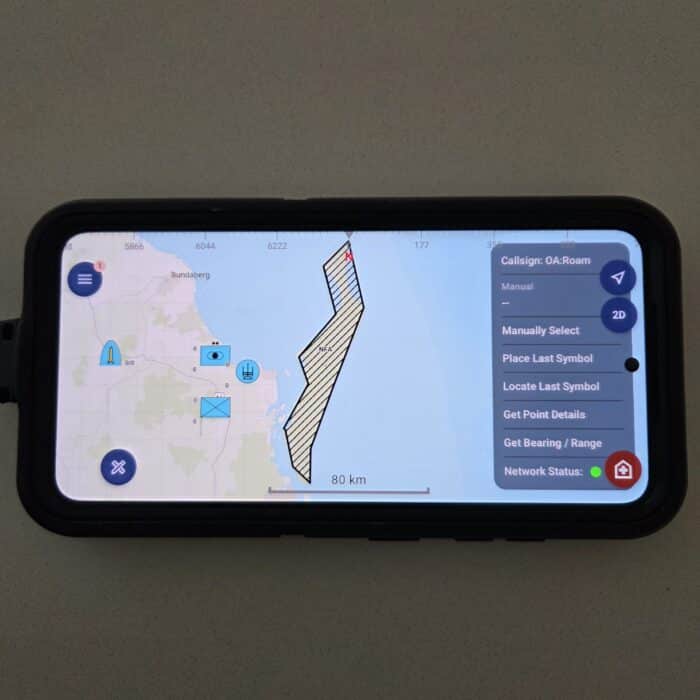
Mapping Features.

  • ArcGIS ESRI: A full‑featured geospatial engine that handles 2D/3D/real‑time mapping, data integration (imagery, vector, elevation, live feeds) and enterprise‑scale sharing. On top of this, ArcGIS supports full military symbology (including MIL‑STD‑2525D) so tactical overlays and operational maps can be standard‑compliant and deeply integrated — not just added on. The result: IRIS users get a unified platform for mapping plus situational awareness, not just a separate tactical map..
  • Free Drawing: Supports drawing of polylines, points, polygons (including circles, triangles, arrows, rectangles, and freehand shapes).
  • Image Insertion: Allows users to add images or pictures directly to the map.
  • Offline and Online Maps: Offers users the choice between dedicated offline maps or online maps when an internet connection is available.
  • Raster and Vector File Support: Ingests various file types, including TIFF, PNG, Geopackages, KML, KMZ, DTED, and Shape Files.
  • Map Grids: Displays grids in degrees or MGRS formats.
  • Route and Direction Tools: Allows users to calculate and display optimal routes between locations using both online and offline ArcGIS Street Maps (with routing layer enabled).
  • Measuring Tools: Provides distance and bearing measurements between two points on the map.
  • Node Track History: Tracks and displays node movement history.
  • Address Search: Enables lookup for specific locations on the map.

Tactical Overlays

  • Overlay Creation: Users can develop tactical overlays before transmission.

Location Service

  • User Location: Displays any selected user’s location on the map.

Communication Features

  • Radio Web UI: Web-based UI for interfacing with supported radio systems.
  • Situational Awareness (SA) / Position Location Information (PLI): Receives and displays SA/PLI via connected radios or other sources, including Cursor on Target (CoT xml, CoT Protobuf (TAK)), NATO Friendly Force Indicator (NFFI) and JSON over multicast or unicast data.
  • GPS Input: Supports NMEA data from serial (DAGR), TCP, and UDP sources.
  • Custom Symbology: Configurable MIL-STD 2525D symbology for both received and transmitted radio-generated SA/PLI.
  • Geofence: A geofence is a virtual boundary defined around a geographic area of interest. In IRIS, geofences are used to monitor location-based events, such as when a tracked entity enters or exits a predefined area. These geofences can be circular, polygonal, or based on existing map features and are typically configured with specific rules to trigger actions when an entity interacts with them.

Video Support

  • Mission Recording: Allows recording and playback of mission video.
  • Video Streams: Supports video playback from network streams (e.g., Rover stream). If the video stream or file contains embedded location metadata (such as from a drone feed), the user can direct the map to the corresponding location in real-time or as required.

Messaging Features

  • Group and Private Chat: Includes point-to-point private chat functionality.
  • Email: Supports email functionalities with attachments, replies, forwards, and retention.
  • File Transfer: Allows easy transfer of files between users.
  • Predefined Messages: Includes templates for messages such as Orders, SITREP, OPDEM, PRIDEM, Surveillance Reports, Suspicious Activity, and Casevac.
  • TAK Integration: Receives and views TAK-produced symbology and supports group chat transmission and reception from TAK.
  • Message Logging: Logs all message types to support non-repudiation and retrieval, including post-activity logging.
  • Group Chat, Private Chat – Point to Point

Networking Protocols and Services

  • Middleware: IRIS connects dissimilar networks peer-to-peer without routers or servers, using software gateways bound to the device’s available interfaces. It discovers peers, bridges traffic between nets, and preserves both multicast and unicast flows within and across those nets – enabling COP updates, chat, files, and reports to move reliably between MANETs, tactical IP radios, VPNs, VLANs and WAN or SATCOM links while keeping configuration simple and resilient.
  • Serverless Architecture: Avoids single points of failure with its serverless design.
  • Reliable UDP: Utilises reliable UDP protocols, with the option for users to modify the protocols if needed.
  • Protobuf Messaging: Uses Protobuf messaging for efficient and structured transmission of messages across the network.
  • Traffic Marking: Ensures Quality of Service with Traffic marking (Type of Service – TOS).
  • Common Operating Picture: Maintains an up-to-date common operating picture as nodes join or leave the network.

General Features

  • Platform Compatibility: Available on Linux Debian, Windows Desktop, Windows tablets (GVA-compatible with virtual keyboard), and Android.

Minimum System Requirements

  • Operating System: 64-bit Microsoft Windows 10
  • Processor: x86_64 architecture; quad-core CPU recommended
  • Memory (RAM): Minimum 4 GB; 16 GB recommended
  • Storage: Minimum 850 MB up to 210 GB of available space. Typical installation requires 20–50 GB of free space
  • Display Resolution: Minimum 1366 x 768; 1920 x 1080 recommended
  • Android: Android version 12 or higher

Some Initial Australian Defence Land Network Integration Center (LNIC) Comments

  • IRIS is simple to configure and deploy. The LNIC Battle-lab used IRIS to quickly confirm the status/health of a multi-hop/multi-echelon tactical radio architecture employed for a synthetic T&E activity. Although the back-end configuration files could have been modified , LNIC had no reason to edit them specifically for the activity.
  • IRIS is interoperable with the 82nd airborne NetAgility SBU TAK network. This included key protocols for each battle management system (TAK – both CoT XML and CoT protobuf); Sitaware – STC CoT GW and SHQ CoT GW; and TAK GeoChat – protobuf.
  • IRIS did not require any server infrastructure to distribute COP data, emails, OPORDS, and reports. The only system similar to this in the TAK ecosystem is DITTO and/or SHARE – however we do not have sufficient OQE to inform a recommendation on what software would be suitable for these use cases.
  • IRIS appeared to have significantly lower data overheads when compared to a TAK-centric network. LNIC would need to conduct further validation utilising representative land systems to provide greater fidelity and assurance on the indicative rates and differences to TAK and other battle management software. 
  • IRIS mobile has a useful “network interface ping” button that allowed us to check the connectivity between the EUD and the radio. ATAK requires a separate Network Monitor plugin that is time consuming to configure at scale.
  • IRIS mobile allowed for per-node configurations when deploying from a pipeline. This is something ATAK does not natively support unless an Mobile Device Manager (MDM – such as Watchtower) or custom Android Debugging Bridge (ADB) scripts are used post-deployment.

Why choose IRIS

Why choose IRIS paper

User Manuals

Windows User Guide here

Android User Guide here

Some videos

Android version overview

Android CASEVAC

Android SA/PLI

Android address search and transmission

Android Free Draw

Windows version military symbols

IRIS on Linux

IRIS in Docker Container

Windows version location view

Windows version 3D mapping

Android 3D Scene Layer

Windows version ADSB Feed

Emergency Services Support Videos

Windows Emergency Service example

Android Emergency Service example

All Videos

Some Example Offline Maps (Esri tile file .tpkx)

Wellington NZ Map

Newtown Central 3D overlay (.slpk file use with Wellington Map)

Brisbane QLD

Canberra ACT

Pucka

Townsville

Email if you require additional maps.

Contact us should you wish to request a demonstration or explore opportunities for live trial activities.
Staff Rostering Application

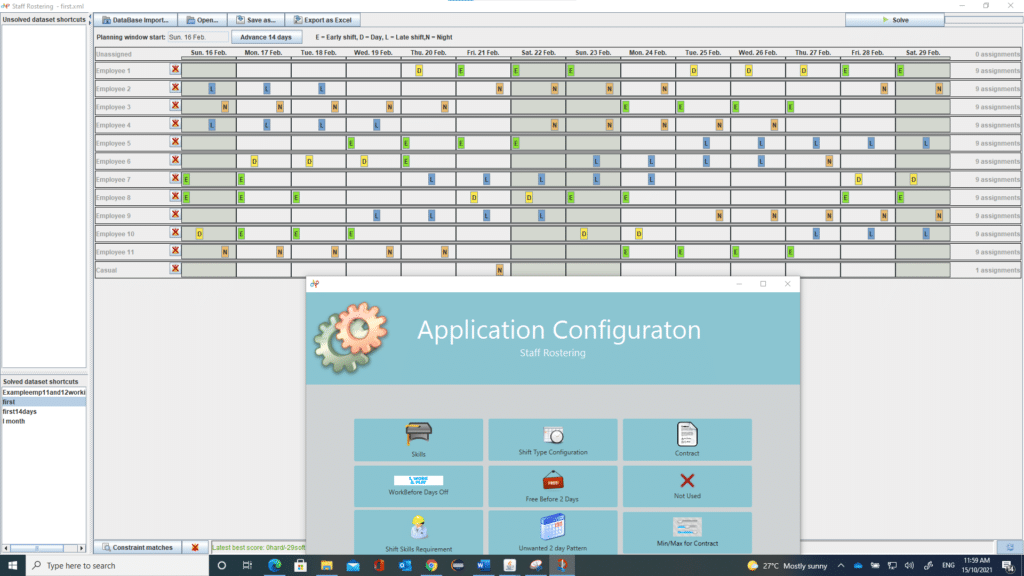
Rostering Application based upon Optaplanner

  • Based on 14 day roster cycles with the ability to provide continuous  planning
  • Enforces contract requirements
    • Minimum and maximum working days within a 14 day period
    • Minimum and Maximum days off after a rostered period
    • Enforced days off after a night shift period
    • Ensures the right skills for shift requirements
    • Allocates casuals as required
    • Maximum and minimum weekends worked with a month
    • Supports multiple departments
    • Supports employee requests 
      • Days off/on
      • Shift Off/on

For an overview visit


Contact us

With a focus on efficiency and real-world operations, create connections with Neoplexus. Contact us today to find out how our communications technology integrators in Australia can upgrade, integrate, and improve your telecommunications.


Page Visited

Loading

Hi there.

Want to get in touch?

Drop us a line